

Smarter Product Training for Computers and Electronics with AI and Interactive Video
Computers and electronics demand product training that helps retail teams turn technical detail into useful advice.
Advisors need to explain how processors, memory, battery life and connectivity affect everyday use, then guide customers towards products that suit their needs. Interactive video brings these conversations into the learning experience through demonstrations, decision points and questions that let advisors practise applying their knowledge.
AI can help training teams draft lessons, develop practice questions and adapt approved material for different audiences, with product experts reviewing technical accuracy before publication. Together, these tools support focused learning that prepares advisors to compare products clearly, demonstrate relevant features and make informed recommendations as ranges evolve.

A New Generation of Online Training: AI Authoring Meets Interactive Video
AI and video are changing how training teams create learning experiences, making it easier to move from approved source material to engaging lessons and practical activities.
A new generation of AI authoring tools brings together reusable design templates, assistant agents and multimedia creation within a connected workflow. Templates give authors a consistent visual foundation, while AI assistants can help structure lessons, simplify explanations and draft questions.
Video adds demonstration and human expression: learners can watch a process, answer questions through a video quiz, then record themselves applying what they have learned. Video assistants can also help authors develop scripts, captions and supporting explanations, depending on the tool. These capabilities give training teams more ways to create and update content, while subject experts remain responsible for accuracy, instructional quality and final approval.
Design templates: Give authors reusable layouts that maintain brand consistency and provide a clear starting point for lessons.
AI assistant agents: Support planning, drafting and revision, helping authors turn approved information into structured learning activities.
Video quizzes: Add questions and feedback to demonstrations, asking learners to interpret what they see and apply their knowledge.
Video assistants: Help prepare scripts, captions, summaries and explanations, with available functions varying by platform.
Recorded practice: Let learners demonstrate a skill or explain a product, giving trainers concrete material for feedback.
Easier content updates: Help teams revise individual lessons and activities as products, processes or learner needs change.
Expert oversight: Keep factual checks, learning objectives and publishing decisions in the hands of qualified reviewers.
First step: Define Product Training Success Through Observable Skills
Effective product training should prepare advisors to use technical knowledge in a customer conversation.
Before creating lessons, define what they should be able to explain, demonstrate, check and recommend. An advisor may correctly recall a computer’s memory capacity yet struggle to explain whether it suits a customer’s intended use. These capabilities require different assessments: knowledge checks establish whether essential facts are understood, while demonstrations and realistic scenarios reveal how advisors apply them.
Together, they give managers a clearer basis for assessing readiness and providing targeted coaching.
Explain features clearly: Translate technical details into accessible explanations, connecting them to relevant uses without exaggerating benefits.
Compare products accurately: Use approved information to explain differences and trade-offs, rather than assuming the highest specification is always the best choice.
Demonstrate practical functions: Show setup steps and everyday tasks in a clear sequence, including any necessary precautions.
Check compatibility and limitations: Verify connections, accessories, software requirements and supported functions before making a claim.
Ask before recommending: Explore the customer’s intended use, existing equipment, preferences and budget to guide a considered recommendation.
Consult current documentation: Recognise uncertainty and locate an approved answer instead of guessing.
Assess facts and application separately: Combine specification checks with observed demonstrations, recorded explanations and customer role-plays. Use the findings to identify whether an advisor needs stronger knowledge, more practice or both.
Make Product Demonstrations Active with Interactive Video
A product demonstration becomes a learning activity when advisors must interpret what they see, make a decision and receive useful feedback.
Instead of watching a presenter explain every feature, learners can pause to identify a customer need, choose a setup step or spot a compatibility issue. The Learning Lab’s interactive video, video quiz and video assessment capabilities support a sequence that moves from observing a demonstration to checking understanding and practising an explanation.
Each interaction should serve a clear purpose: testing a decision the advisor will need to make with a customer. Feedback should explain the reasoning behind an answer and guide the learner towards accurate, relevant advice.
Video quiz — connect features to customer needs: Pause a laptop demonstration and ask which feature matters most to a customer who travels frequently. Explain the trade-offs behind the answer.
Setup decision — choose the next step: Ask learners what they would do next during a device setup, including any prerequisite or precaution they should check.
Compatibility check — identify missing information: Present a proposed device-and-accessory combination and ask what must be verified before recommending it.
Feature explanation — translate technical language: Ask learners to select an accurate, accessible explanation of a headphone feature, then explain why alternative answers may mislead.
Video assessment — demonstrate understanding: Have advisors record a short product presentation or customer recommendation. Review accuracy, relevance, clarity and demonstration technique.
Video hotspots — explore relevant details: Where supported, use selectable areas to examine ports, controls or components. Follow exploration with a practical question about their use.
Live video and video chat — practise with guidance: Use supported live tools or connected sessions for demonstrations, questions and role-play, giving advisors opportunities to clarify uncertainty.
Video experts — bring specialist knowledge into learning: Include approved explanations from product experts, with a clear route for questions that need further investigation.
Meaningful feedback — explain the decision: Show why an answer fits the situation, what information supports it and when the advisor should consult current documentation.
Use AI-Supported Adaptive Learning to Target Individual Needs
AI-supported adaptive learning uses evidence of a learner’s knowledge and progress to help determine what they should study or practise next.
In electronics product training, one advisor may understand computer specifications but struggle to explain them to customers, while another needs support with compatibility checks. An adaptive approach can recommend different activities for each person, using assessment results, previous responses and demonstrated gaps.
Depending on the platform, it may adjust the sequence, difficulty or reinforcement provided. The aim is to make learning more relevant while preserving essential training requirements. Recommendations should remain grounded in approved content, with managers able to review progress and intervene when needed.
Identify starting knowledge: Use an initial assessment to establish what an advisor understands and where support is needed.
Recommend relevant activities: Direct learners towards lessons, interactive videos or practice scenarios that address specific gaps.
Adjust challenge appropriately: Offer foundational explanations to learners who need them and more demanding customer scenarios to those ready to progress.
Provide targeted reinforcement: Revisit misunderstood concepts through fresh examples and follow-up questions.
Distinguish knowledge from application: A strong quiz score may justify a practical demonstration next; it does not automatically establish customer-facing readiness.
Preserve essential standards: Keep required product, safety and compliance learning in place, even when other parts of the journey vary.
Support human judgement: Give trainers visibility into recommendations and results, recognising that incomplete assessment data can lead to an inaccurate picture of ability.
Use AI to Create Learning Content with Expert Oversight
AI can help training teams turn approved product documentation into structured lessons, questions and practice activities.
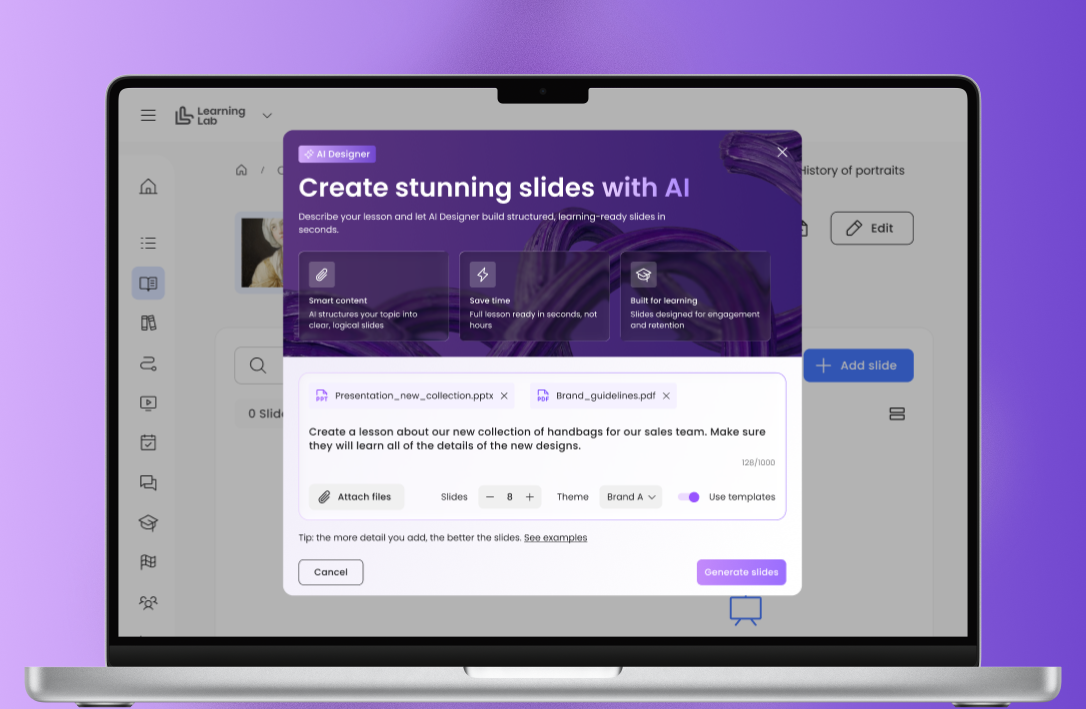
Within The Learning Lab’s AI-assisted creation workflow, authors can develop initial content, refine explanations and prepare translations for review. The starting point should always be validated source material, with clear instructions about the audience, learning objective and product version.
AI-generated content remains a draft: product experts must verify specifications, compatibility, terminology and claims, while training specialists check the learning structure and feedback. Publish only after the designated reviewers have approved the material, and return unsupported statements to the source owner for clarification.
Draft lessons from approved documentation: Use validated product sheets, manuals and launch materials to prepare focused lessons. Keep references to the source documents so reviewers can check each factual statement.
Propose quizzes and explanations: Generate questions around essential knowledge and practical decisions. Review the correct answer, alternatives and feedback for accuracy and ambiguity.
Adapt technical language: Prepare explanations for new advisors, experienced specialists or retail partners without changing the meaning or removing important limitations.
Create initial translations: Use automated translation as a starting point, then ask local reviewers to check technical terms, product names and market-specific details.
Suggest customer scenarios: Draft realistic situations that require learners to ask questions, compare options or check compatibility. Have experts validate both the scenario and the proposed response.
Assign clear approval responsibilities: Product experts approve technical facts; local teams validate language and market relevance; training teams review instructional quality and manage publication.
Maintain control after publication: Record the approved version, review date and content owner. When source information changes, review affected lessons, quizzes and translations before releasing updates.
AI supports content development; approved product sources and accountable reviewers remain the authority for product facts.
Build a Learning Journey from Customer Need to Confident Recommendation
A practical learning sequence should connect product knowledge with the decisions an advisor makes during a customer conversation.
Consider an illustrative laptop scenario: a customer needs a computer for frequent travel, video meetings and occasional photo editing. Rather than immediately presenting a model, the advisor must clarify priorities, assess relevant features and explain the trade-offs.
Within a branded learning journey, video provides the demonstration, questions guide the reasoning and recorded practice reveals how clearly the advisor can communicate a recommendation. Each activity builds towards a realistic task, with feedback and another attempt helping learners address specific gaps.
Customer need — investigate before recommending: Introduce the customer through a short video or written profile. Ask what the advisor still needs to know, including budget, software requirements, existing accessories, portability preferences and the demands of their photo-editing work.
Product demonstration — focus attention on relevant details: Show the laptop’s screen, keyboard, ports and everyday functions. Use verified information to explain how its specifications relate to the customer’s tasks, stating the conditions behind performance or battery-life claims.
Interactive decision — weigh the trade-offs: Present two fictional configurations or verified current models. Ask learners to select an option and justify the choice, considering the customer’s priorities. Explain when a different answer could be reasonable.
Knowledge check — confirm essential facts: Test the specifications, limitations and compatibility requirements needed for the recommendation. Include a question where consulting approved documentation is the correct next step.
Recorded recommendation — practise the conversation: Ask the advisor to deliver a concise explanation that connects the chosen laptop to the customer’s needs, acknowledges a relevant trade-off and identifies anything still to verify.
Feedback and retry — turn assessment into improvement: Review factual accuracy, relevance and clarity. Give specific coaching, then invite a revised recording that demonstrates how the advisor has applied it.
A consistent branded journey — connect every step: Use coherent visuals, terminology and navigation throughout. Keep approved product resources accessible so learners practise finding reliable information as well as recalling it.

Check Practical Readiness Through Video Assessment
Video assessment gives advisors an opportunity to demonstrate how they use product knowledge in a realistic customer interaction.
Ask them to record a short product demonstration or recommendation using an approved scenario and current technical information. The Learning Lab’s recording, video assessment and feedback tools can support this process, giving reviewers a concrete example to assess and discuss. Set expectations before recording, then use consistent criteria to identify strengths and coaching needs.
A reviewer should point to specific moments, explain what needs improving and invite another attempt where necessary. The assessment described here relies on human review.
Accuracy — are the technical statements correct? Check specifications, compatibility, setup instructions and performance claims against approved documentation. Look for appropriate acknowledgement of limitations and uncertainty.
Relevance — does the recommendation address the customer’s needs? Assess whether the advisor connects features to the scenario, explains meaningful trade-offs and identifies any questions still to resolve.
Clarity — is the explanation understandable? Listen for accessible language, a logical structure and explanations that make technical terms useful to the customer.
Demonstration quality — are the steps appropriate and easy to follow? Check that the product is visible, actions follow a sensible sequence and any necessary precautions are explained.
Feedback — what should the advisor improve? Use written or audio feedback to describe a specific strength and one or two priority changes. Separate factual corrections from presentation advice.
Reassessment — has the guidance been applied? Request a revised recording when needed and compare it against the same criteria. Keep unresolved gaps visible to the manager before confirming readiness.
Keep Product Training Accurate Across Launches and Markets
Electronics training needs to evolve as products, software and local ranges change.
A demonstration that was accurate at launch may become outdated after a software update, while a model or accessory available in one market may differ from its counterpart elsewhere. Assign a named owner to each learning resource, record its approval and review dates, and define which changes should trigger an immediate check.
Short mobile lessons can communicate focused updates without requiring advisors to repeat an entire course. Give retail teams scheduled learning time to review those changes, and use local experts to validate translations, captions and technical terminology before publication.
Assign accountable content owners: Name the person responsible for checking each resource, coordinating approval and communicating updates.
Set review dates and change triggers: Combine scheduled reviews with checks prompted by launches, software releases, specification corrections or changes to the range.
Verify exact product references: Check model numbers, regional variants and configurations so advisors do not apply information from a similar but different product.
Recheck accessories and software: Confirm compatibility, required connections, supported versions and any limitations that affect setup or use.
Validate local availability: Distinguish the global product story from market-specific assortments, launch dates and services. Direct advisors to current systems for changing stock information.
Publish focused mobile updates: Use a short lesson, annotated demonstration or targeted quiz to explain what changed and what advisors should do differently.
Review language and accessibility: Ask qualified reviewers to check translations, captions, on-screen labels and technical terms for accuracy and consistency.
Schedule time to learn: Coordinate with boutique or store managers so teams can review updates during working hours, with suitable devices and support.
Control outdated versions: Clearly identify current materials and remove or archive superseded resources to reduce conflicting guidance.
Support Learners with an AI Chatbot
An AI chatbot can help advisors find explanations and revisit product knowledge while they learn.
Connected to an approved knowledge base, it can answer questions about technical terminology, clarify lesson content and guide learners towards relevant resources. An advisor might ask for an explanation of memory and storage, or help understanding which compatibility details to check before recommending an accessory.
The chatbot should make its sources visible, recognise when information is missing and direct unresolved questions to a product expert. Its usefulness depends on the quality and currency of the material it can access; fluent answers alone are not evidence of accuracy.
Clarify technical concepts: Explain unfamiliar terms in accessible language, with examples relevant to customer conversations.
Reinforce lessons: Help learners revisit difficult topics and locate supporting videos, demonstrations or activities.
Support product questions: Retrieve approved information for the exact model, market and software version where available.
Guide discovery: Suggest questions an advisor should ask before comparing products or making a recommendation.
Show sources and limitations: Link answers to approved resources and acknowledge when the available information does not support a reliable response.
Escalate uncertainty: Refer unresolved compatibility, safety or product questions to an appropriate expert rather than generating a plausible answer.
Identify content gaps: Review recurring questions to improve training materials, with appropriate controls over learner and customer information.

Your Implementation Checklist for Electronics Product Training
Effective electronics training brings accurate information, purposeful interaction and practical coaching into one learning journey.
Use this checklist to plan delivery, assign responsibilities and assess whether advisors can apply their knowledge. Select AI and video functions according to the learning need, and confirm their availability and configuration before including them in your programme.
1. Define observable learning objectives
Specify what advisors should explain, compare, demonstrate and check.
Use a retail skills matrix to map expectations by role and experience.
Identify the evidence managers will need to assess readiness.
2. Establish approved source material
Gather current product documentation, specifications, compatibility guidance and approved imagery.
Record model numbers, software versions and market differences.
Assign content owners, approval responsibilities and review dates.
3. Plan purposeful video activities
Use interactive video and video quizzes to test relevant decisions.
Include video hotspots, where supported, to explore product details.
Plan video assessments for recorded demonstrations and recommendations.
Use video chat or live sessions, where available, for expert questions and coached practice.
4. Give AI clear authoring responsibilities
Use an AI assistant authoring tool to draft lessons, questions and scenarios from approved sources.
Apply branded templates and review automatically generated layouts for readability and consistency.
Where available, use a voice or typed administration assistant to support routine tasks, checking proposed changes before applying them.
5. Review AI-generated content before publication
Check every technical statement, answer explanation and customer scenario.
If using AI avatars in lessons or quizzes, validate their scripts, pronunciation, captions and presentation.
Keep factual approval with product experts and instructional approval with training specialists.
6. Configure learner support and personalisation
Connect chatbots and AI-enhanced search to current, approved resources.
Require clear source references and a route for unresolved questions.
Where supported, use adaptive learning recommendations alongside assessment results and the retail skills matrix.
Let managers review recommendations rather than treating automated skills inferences as definitive.
7. Validate technical accuracy
Test setup instructions and demonstrations using the relevant products.
Recheck accessories, connections, software requirements and limitations.
Remove unsupported claims and resolve conflicting information.
8. Localise and check accessibility
Use automatic translation as an initial draft for qualified local review.
Validate terminology, regional availability and product references.
Check captions, audio, on-screen text and mobile usability.
9. Schedule practice and manager feedback
Allocate learning time during working hours.
Combine customer scenarios with recorded recommendations and hands-on demonstrations.
Assess accuracy, relevance, clarity and demonstration quality.
Provide specific coaching and opportunities to retry.
10. Measure, maintain and improve
Establish a baseline and agreed review intervals.
Track participation, knowledge and demonstrated behaviour separately.
Interpret commercial outcomes alongside traffic, stock, pricing and campaigns.
Use recurring questions and assessment gaps to prioritise updates.
Archive outdated resources and communicate approved changes.
Explore how The Learning Lab can help you combine interactive video, AI-assisted content creation and practical assessment to prepare your electronics retail teams for confident customer conversations.